

概览
每行完整记录一次 API 调用:系统提示、工具定义、对话、思考、工具调用及结果、token 用量。会话在真实软件项目里进行,也有从空目录起步的。现货有 Claude Opus 5 会话 9 万多个、Kimi K3 会话 5 万多个;其他模型按需生产。
交付内容
<session-id>.jsonl # 每行一次 API 调用
├── session_id     # 每行相同
├── model          # 例如 kimi-k3
├── request        # 完整请求体
│   ├── system     # 系统提示
│   ├── tools      # 22–26 个工具定义
│   ├── messages   # 截至本次调用的对话
│   ├── thinking, output_config, stream
│   └── max_tokens, context_management
├── response       # 完整的模型响应
│   ├── content    # 思考、文本、tool_use
│   ├── stop_reason
│   └── usage      # token 用量
├── error          # 仅失败的调用有
└── flags # 异常标记(如有)- 每行都有完整上下文:每次请求都带着之前的全部对话,所以文件较大;用 tar.zst 打包后可压缩 80–247 倍。
- 每次调用都保留:重试、上下文压缩,以及联网搜索之类的辅助调用,都留在文件里。
- 思考:Opus 5 的思考由 API 摘要后返回,带签名;Kimi K3 的思考不带签名。
- 项目语言:按项目的主编程语言计,共 25 种。
样例
下面 5 个会话,两个模型都有。节选略去了部分步骤和 Claude Code 自动插入的 system reminder;“…”表示此处有删节,主目录显示为 ~。文中的“轮”指用户的一次提问,加上 Agent 回复前的全部处理,一轮里通常有多次模型调用和工具调用。
样例 1 / 5
从空目录写 shell 脚本:缺的补上,已有的不动
用户要让 /data/users 下每个人的目录都有四个固定子目录,已有的一律不动。Agent 把 cache/tmp 当作嵌套路径处理并请用户确认,又造了一套含四种情况的临时目录,先 dry-run 再实跑。第 2 轮用户让 Agent 去掉它自作主张加上的 chown;第 3 轮要求没缺东西时别输出汇总,Agent 照做,但为根目录下一个用户都没有的情况留了一条提示,并说明理由。
- 用户提问次数
- 3
- API 调用(文件行数)
- 14
- 工具调用:Bash 6、Edit 3、Write 1、Read 1
- 11
- 思考块(摘要,带签名)
- 7
- 会话文件(未压缩)
- 1.5 MB
节选:全部 3 轮
- 思考
I need to write a script ensuring each user directory has raw, processed, notebooks, and a cache/tmp structure — though I'm second-guessing whether "cache/tmp" means a nested tmp folder inside cache, or two separate top-level folders. … I also want newly created subdirectories to inherit ownership from their parent directory rather than defaulting to root, using
chown --reference=when running with elevated privileges — that seems like the careful approach. … - 工具调用 Write
file_path: ~/…/ensure_user_dirs.sh content: … # 已存在的目录不做任何改动(不动内容、不改权限)。 … # 需要保证存在的子目录。想改成 cache 和 tmp 平级,把 "cache/tmp" 换成 "cache" "tmp"。 SUBDIRS=(raw processed cache/tmp notebooks) … elif [[ -e $path || -L $path ]]; then # 同名的文件/坏软链挡在这儿,不能 mkdir,也不该删 —— 交给人处理。 blocked+=("$sub") … - 工具调用 Bash
… FIX=$(mktemp -d)/users … # bob: 只有 raw,另外有些自己的东西 mkdir -p "$FIX"/bob/raw "$FIX"/bob/my_stuff … # dave: notebooks 是个文件,挡路了 mkdir -p "$FIX"/dave/{raw,processed} touch "$FIX"/dave/notebooks … ~/…/ensure_user_dirs.sh -n "$FIX" … - 工具返回 Bash
…
ok   alice
bob
  + processed (dry-run)
  + cache/tmp (dry-run)
  + notebooks (dry-run)
…
dave
  ! notebooks 已存在但不是目录,跳过
  + cache/tmp (dry-run)
---
扫描 4 个用户,缺 8 个目录,1 个需要人工处理(dry-run,未改动)
另外 9 步:第 2–3 轮
- 工具调用 Bash
…
grep -n -i "chown\|EUID" ensure_user_dirs.sh || echo "无 chown 残留"
…
- 工具返回 Bash
无 chown 残留
--- 语法检查:
OK
…
--- 再跑一遍:
ok   alice
ok   bob
ok   carol
---
扫描 3 个用户,新建 0 个目录,0 个失败
退出码: 0
- 思考
The user wants the summary line skipped when nothing was missing—when created and failed are both zero, so I should suppress that output.…
There's also an edge case: an empty root directory with zero users would produce no output at all, which could look like the script silently failed. I'm considering adding a distinct warning line for that scenario since it likely signals a wrong path, though I want to flag it separately since it's slightly beyond the user's explicit request.…
- 工具调用 Edit
file_path: ~/…/ensure_user_dirs.sh old_string: … new_string: if ((users == 0)); then # 一个用户目录都没扫到,多半是根目录传错了,这个得说一声。 echo "$ROOT 下没有用户目录" >&2 elif ((created || failed)); then echo "---" … - 工具调用 Bash
…
- 工具返回 Bash
…
=== 全齐了(dave 先挪走):不打总结 ===
ok   alice
ok   bob
ok   carol
[退出码 0]

=== 全齐 + -q:完全静默 ===
[退出码 0]
…
=== 空根目录 ===
…下没有用户目录
[退出码 0]
样例 2 / 5
需求反复变的 CSV 统计脚本
一个按天统计价格阈值以下平均点击率的一次性脚本。Agent 在思考里先定下用户没提到的口径(按曝光加权,还是逐行平均),测试用的是一份能手算核对的小 CSV。第 2–4 轮用户先要图,再要回自己叫停过的对比功能,又嫌多出了没要的列;第 5、6 轮复查图表,并把 CTR 改成百分比显示。Agent 每次出图都打开图片自查,遇到空单元格先回原始数据核对,确认不是 bug 才汇报。
- 用户提问次数
- 6
- API 调用(文件行数)
- 29
- 工具调用:Bash 11、Edit 8、Read 3、Write 1
- 23
- 思考块(无签名)
- 20
- 会话文件(未压缩)
- 7.8 MB
Agent 画出并打开自查的图
第 2 轮
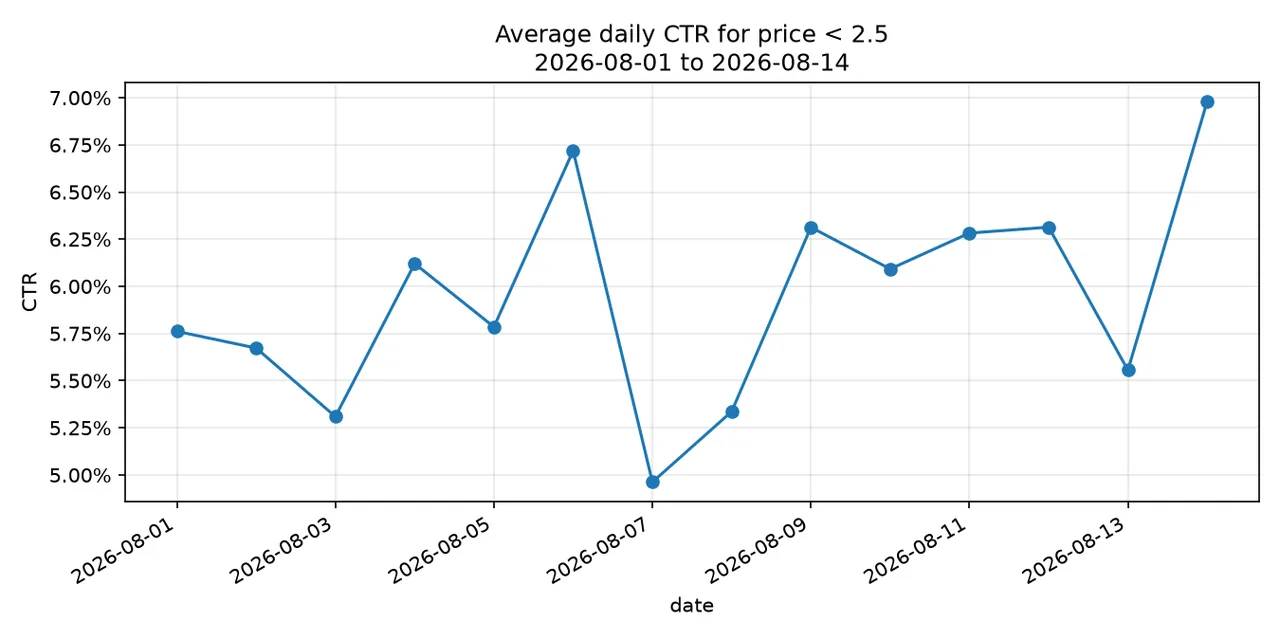
--plot 用 14 天测试数据画出的图。Agent 在会话里打开这张 PNG 看过之后才回复。
第 3 轮
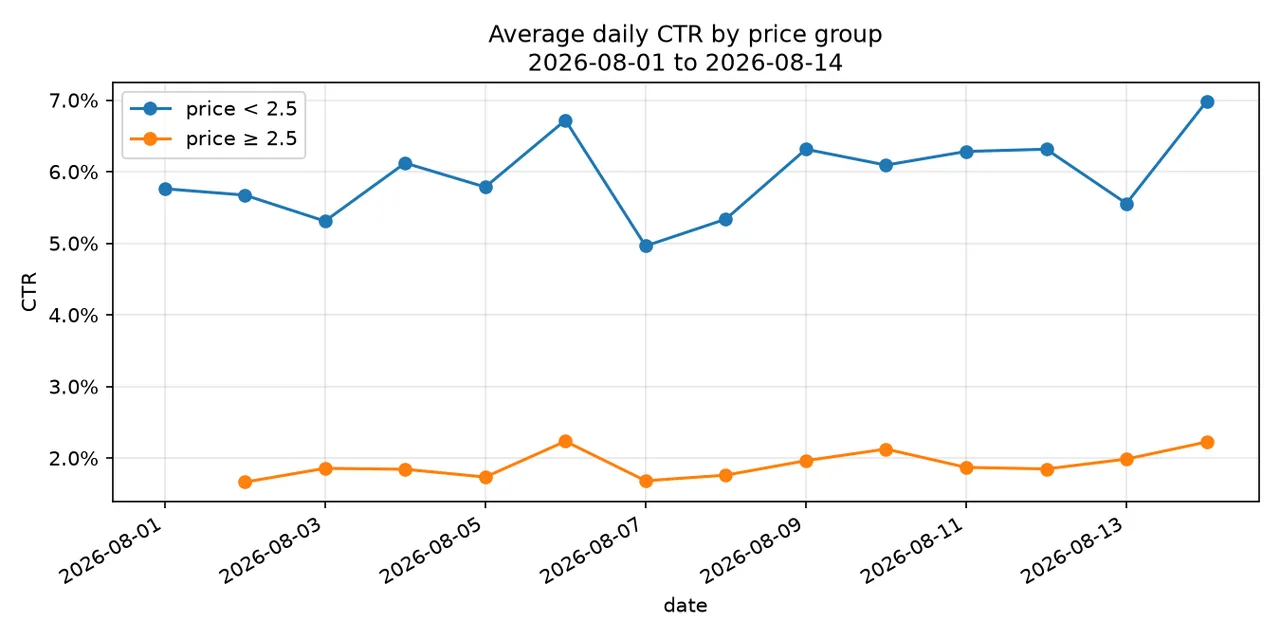
--compare 把两个价格组画在一张图上。第一天橙线没有点:当天没有价格在 2.50 及以上的行,Agent 先回原始数据核对过才这么说。
节选:第 1–4 轮
- 思考
… They mention their underlying goal: seeing whether cheaper listings get clicked more. There's a subtle statistical point here — "average CTR" could mean either:
- Mean of per-row CTRs (simple average of ratios)
- Weighted CTR (sum clicks / sum impressions per day)
…
- 工具调用 Write
file_path: ~/…/avg_ctr.py content: #!/usr/bin/env python3 """Average CTR by date for rows under a max price, within a date range. … CTR per day is sum(clicks) / sum(impressions) across the matching rows (i.e. impression-weighted, so big rows count more than tiny ones). … if float(row["price"]) >= args.max_price: continue clicks[d] += int(row["clicks"]) imps[d] += int(row["impressions"]) … - 工具调用 Bash
cat > …/test_imps.csv <<'EOF'
date,price,clicks,impressions
2026-08-01,1.00,10,200
2026-08-01,5.00,999,1000
2026-08-01,0.50,3,100
2026-08-02,2.00,20,400
2026-08-03,1.50,0,50
2026-07-30,1.00,50,500
EOF
python3 ~/…/avg_ctr.py …/test_imps.csv --max-price 2.50 --start 2026-08-01 --end 2026-08-02 && rm …/test_imps.csv
- 工具返回 Bash
date,ctr,clicks,impressions
2026-08-01,0.0433,13,300
2026-08-02,0.0500,20,400
另外 10 步:第 2–4 轮
- 工具调用 Bash
…
- 工具返回 Bash
--- compare mode ---
date,ctr_under,ctr_over,clicks_under,imps_under,clicks_over,imps_over
2026-08-01,0.0576,,375,6509,0,0
2026-08-02,0.0567,0.0166,172,3032,57,3426
2026-08-03,0.0531,0.0186,242,4558,41,2209
…
- 工具调用 Bash
grep "^2026-08-01" …/test_imps.csv
- 工具返回 Bash
2026-08-01,2.11,20,358
2026-08-01,0.53,106,1731
2026-08-01,2.35,12,168
2026-08-01,1.48,13,226
2026-08-01,0.65,14,235
2026-08-01,0.59,56,1208
2026-08-01,1.53,84,1334
2026-08-01,0.61,70,1249
- 工具调用 Edit
file_path: ~/…/avg_ctr.py
old_string:
    if args.compare:
        print("date,ctr_under,ctr_over,clicks_under,imps_under,clicks_over,imps_over")
…
new_string:
    if args.compare:
        print("date,ctr_under,ctr_over")
        for d in days:
            print(",".join([str(d), fmt(ctr("under", d)), fmt(ctr("over", d))]))
样例 3 / 5
接手的 React + Vite 项目:说法被质疑后实测
用户接手了一个 React + Vite 项目,问开发服务器能不能传端口参数。第一次验证就失败了:依赖从没装过,Agent 按锁文件装好依赖(锁文件本身不动),再重新验证。用户追问“端口被占时会悄悄换到 5001”是不是猜的,Agent 就动手实测:第一次占端口用的是 IPv4,而 Vite 绑在 IPv6,根本没撞上;改为占住同一个 IPv6 地址后,Vite 换到 5001 并打印了提示,Agent 随即收回“悄悄”二字。整个会话共 19 轮,后面还有重构、构建验证和 git 相关的问题。
- 用户提问次数
- 19
- API 调用(文件行数)
- 74
- 工具调用:Bash 53、Read 8、Edit 4、Write 2 等
- 69
- 思考块(摘要,带签名)
- 48
- 会话文件(未压缩)
- 15 MB
部分轮次概要
| 轮 | 用户的要求 → Agent 的处理 | API 调用 / 工具调用 |
|---|---|---|
| 1 | 开发服务器能不能传端口 → 按锁文件装好依赖再验证 | 7 / 7 |
| 2 | “你是猜的吗” → 动手实测,收回“悄悄” | 15 / 14 |
| 3 | 一个来历不明的未跟踪文件 → 读过,不动它 | 2 / 1 |
| 4 | strictPort 怎么写 | 2 / 1 |
| 6 | 清理代码,但不改导入名 → 抽出一个 hook,删掉 1 个无用文件和 4 处无用导入,构建通过 | 14 / 20 |
| 8 | 贴出 dev、build、test 的原始输出 → 发现自己取错了退出码 | 5 / 5 |
| 9 | 列出所有改过的文件 | 2 / 2 |
| 14 | 默认端口改成 5000 | 4 / 3 |
| 15 | 第 3 轮那个来历不明的文件还在 | 1 / 0 |
| 16 | 删掉它 | 2 / 1 |
| 17 | 用户把两个 hook 搞混了 → Agent 指出两者无关 | 1 / 0 |
| 19 | 端口改动提交了没有 → 没有 | 2 / 1 |
节选:第 1–2 轮
- 工具调用 Bash
timeout 20 npx vite --port 5000 2>&1 | head -20
- 工具返回 Bash
npm warn exec The following package was not found and will be installed: vite@8.2.2
vite.config.js (1:297) [UNRESOLVED_IMPORT] Could not resolve 'vite' in vite.config.js
…
failed to load config from ~/…/vite.config.js
error when starting dev server:
Error [ERR_MODULE_NOT_FOUND]: Cannot find package 'vite' imported from ~/…/vite.config.js.timestamp-…
- 工具调用 Bash
…
- 工具返回 Bash
--- output ---

> …@0.0.0 dev
> vite --port 5000


  VITE v4.0.4  ready in 232 ms

  ➜  Local:   http://localhost:5000/
  ➜  Network: use --host to expose
另外 8 步:第 2 轮
- 工具调用 Bash
sleep 4; echo "=== vite log ==="; cat /tmp/vite_bg.log; …(ss -ltnp 2>/dev/null || netstat -ltnp 2>/dev/null) | grep -E '500[0-9]'; echo; echo "=== who answers :5000 ==="; curl -s -m 5 http://127.0.0.1:5000/ | head -8
- 工具返回 Bash
…
=== listeners on 500x ===
tcp        0      0 0.0.0.0:5000            0.0.0.0:*               LISTEN      783/python3
tcp6       0      0 ::1:5000                :::*                    LISTEN      971/node

=== who answers :5000 ===
<!DOCTYPE HTML>
…
<title>Directory listing for /</title>
…
- 思考
…python3 grabs IPv4 0.0.0.0:5000 while vite binds IPv6 ::1:5000, so they don't collide and no port bump occurs. That means curl to 127.0.0.1:5000 hits python, not vite, so both servers silently coexist and which one you reach depends on the resolution path — actually worse than a simple bump.

But this doesn't disprove auto-increment in general, it just means my test didn't produce a real collision. To force a true test I need to occupy ::1:5000 specifically…
- 工具调用 Bash
timeout 25 npm run dev -- --port 5000 > /tmp/vite_collide.log 2>&1; echo "=== vite output (::1:5000 occupied) ==="; cat /tmp/vite_collide.log
- 工具返回 Bash
=== vite output (::1:5000 occupied) ===

> …@0.0.0 dev
> vite --port 5000

Port 5000 is in use, trying another one...

  VITE v4.0.4  ready in 342 ms

  ➜  Local:   http://localhost:5001/
  ➜  Network: use --host to expose
样例 4 / 5
一个 PyTorch 小库的 beam search:“你确定吗?”
围绕一个小型序列生成库的 8 轮对话:改写照抄来的 generate() 调用,查出结束符 id 用错,改默认参数。第 6 轮 Agent 说一直不出结束符时会在 49 个 token 处静默截断,第 7 轮用户问这个数是不是随口一说。环境里没有 torch,Agent 把张量运算打桩替换掉,直接导入库里真实的 beam search 文件,跑出实际输出长度。第 8 轮再做一次同类验证,发现自己先前的一个说法错了,回复第一句就承认。
- 用户提问次数
- 8
- API 调用(文件行数)
- 32
- 工具调用:Bash 17、Read 5、Write 3、Edit 1 等
- 27
- 思考块(无签名)
- 24
- 会话文件(未压缩)
- 5.8 MB
部分轮次概要
| 轮 | 用户的要求 → Agent 的处理 | API 调用 / 工具调用 |
|---|---|---|
| 1 | 把照抄来的 generate() 调用改为本库 beam search 的写法 |
5 / 5 |
| 2 | 输出总是跑满最大长度:是长度惩罚,还是结束符 id 错了 | 1 / 0 |
| 3 | 确认是结束符 id 的问题:保留这处修复,起始 token 改回原值 | 2 / 1 |
| 4 | max_length 默认值改成 48 → 实际默认是 1024,且调用处会覆盖 |
3 / 2 |
| 6 | 48 步内没出结束符,是截断还是报错 → 静默截断,输出 49 个 token | 1 / 0 |
| 7 | “你确定吗” → 张量运算打桩,跑真实循环 | 13 / 14 |
| 8 | 这些到底靠不靠谱 → 新的验证推翻了自己的一个说法 | 3 / 2 |
节选:第 6 轮末到第 8 轮
- 思考
The user is calling me out — good. They want me to actually verify the 49-token claim rather than assert it. Let me trace through the code carefully, and better yet, actually run it to verify.
…
- 工具调用 Bash
cd /tmp && (command -v python3 && python3 check_len.py) || ls /usr/bin/python* /usr/local/bin/python* 2>/dev/null
- 工具返回 Bash
Exit code 2 /usr/bin/python3 Traceback (most recent call last): File "/tmp/check_len.py", line 1, in <module> import torch ModuleNotFoundError: No module named 'torch' … - 工具调用 Write
file_path: /tmp/check_len_stub.py
content:
"""Runs the REAL beam_search.py control flow with torch numerics stubbed out.

The actual loop, token appends, break condition and final max() selection in
…/beam_search.py execute verbatim — only tensor math
is faked, which is irrelevant to how many tokens get appended.
"""
…
class CountingGen(…):
    def …(self, logits, …):
        # argmax is always token 3 — never EOS, so the loop can never exit early
…
另外 8 步:第 7 轮后半和第 8 轮
- 工具调用 Bash
PYTHONPATH=~/… python3 /tmp/check_len_stub.py
- 工具返回 Bash
enc-dec, max_length=48, no EOS: [49, 49] | last token: 3
enc-dec, max_length=5,  no EOS: [6, 6]
dec-only, max_length=48, prompt len 3: [48, 48]
- 工具调用 Bash
PYTHONPATH=~/… python3 /tmp/check_eos_stub.py
- 工具返回 Bash
terminated at length: [6, 6]
sequence: [0, 3, 3, 3, 3, 9]
ends with duplicated EOS: False
样例 5 / 5
Vue/Nuxt 项目的旧数据映射:用户要证据
用户问“legacy import”怎么把旧 JSON 映射成现在的数据结构。Agent 先纠正前提:那个文件管的是图片采样,真正的映射在另一个文件里;那里用的是 ??,新字段有值但无效(比如 0)时不会回落到旧字段,直接落到默认值 48。用户要求把这个问题和一个坐标越界不校验的问题带行号记下来,再要求拿出修好的证据;Agent 把两个问题记成任务并写明行号,改了两行代码,又因为项目没有测试框架,写了个一次性脚本把新旧逻辑对照着跑(没装 bun,改用 node)。用户追问一句“负数呢”,又牵出同类缺陷的另一种情况。
- 用户提问次数
- 7
- API 调用(文件行数)
- 34
- 工具调用:Bash 14、Read 6、Write 5、Edit 3 等
- 34
- 思考块(摘要,带签名)
- 21
- 会话文件(未压缩)
- 7.5 MB
部分轮次概要
| 轮 | 用户的要求 → Agent 的处理 | API 调用 / 工具调用 |
|---|---|---|
| 1 | 旧 JSON 是怎么映射的 → 用户指错了文件;讲清真实的映射,指出 ?? 的回落缺陷 |
6 / 9 |
| 2 | 把这个缺陷和坐标越界不校验的问题带行号记下来 → 建了两条任务 | 2 / 2 |
| 3 | 先修第 1 个,贴出改动,给出证据 → 改两行,写新旧对照脚本,没装 bun,改用 node | 10 / 10 |
| 4 | cellW 是负数呢 → 会被 clamp 到下限 8,方形格子变成长方形 | 3 / 2 |
| 5 | 同意修改 → cell、cellW、cellH 改为大于 0 才算有效;跑 25 个用例,列出 13 处行为变化 | 5 / 4 |
节选:第 1–4 轮
- 工具调用 TaskCreate
subject: … 不校验坐标越界,缩图后残留幽灵格子
description:
位置:…/tilemap.ts:41-50(…),校验在第 46 行
…
后果不对称:
- 绘制侧不做边界过滤 —— …(tilemap.ts:235-253) 第 249-252 行遍历全部 entries 直接调…,越界格子照样 drawImage 到画布区域外
- 命中侧做边界过滤 —— …(tilemap.ts:176-189) 第 187 行 `…` 返回 null
=> 画得出来但点不中,也删不掉,等于幽灵数据;…
- 工具调用 Edit
file_path: …/tilemap.ts
old_string:
…
  const cellW = …(t.cellW ?? legacy, …)
  const cellH = …(t.cellH ?? legacy, …)
new_string:
…
  const cellW = …(Number(t.cellW) || legacy, …)
  const cellH = …(Number(t.cellH) || legacy, …)
另外 8 步:第 3 轮后半和第 4 轮
- 工具调用 Write
file_path: /tmp/verify-cellw.ts content: import {…} from '…/tilemap' … // replica of the pre-fix lines 116-118, to show what changed function oldCellW(t: any) { … } … - 工具调用 Bash
bun /tmp/verify-cellw.ts
- 工具返回 Bash
Exit code 127
/bin/bash: line 1: bun: command not found
- 工具调用 Bash
node --experimental-strip-types /tmp/verify-cellw.ts 2>&1 | grep -v ExperimentalWarning…
- 工具返回 Bash
case                          | in                          | old | new | want |
------------------------------|-----------------------------|-----|-----|------|--
旧格式 only                      | {"cell":32}                 |  32 |  32 |   32 | ok
旧 cell + cellW=0              | {"cell":32,"cellW":0,"cellH":0} |  48 |  32 |   32 | ok  <-- 修复点
旧 cell + cellW="abc"          | {"cell":32,"cellW":"abc"}   |  48 |  32 |   32 | ok  <-- 修复点
…
全部 17 个用例通过
可定制
包括但不限于以下几项,其他需求都可以商量。
- Agent:任何能通过 Messages API 或兼容接口调用的模型,effort 可选。
- Agent 框架:指定 Claude Code 版本,或换用其他框架。
- 工作目录:编程语言构成、空目录比例、CLAUDE.md、skills、未提交的改动。
- 对话:用户提问次数、任务类型、中文或英文。
- 输出:原始逐行记录、按轮次和角色标注的记录,或拼成整段的对话。
- 数量和排期:会话数量、模型和语言的配比,以及交付时间。